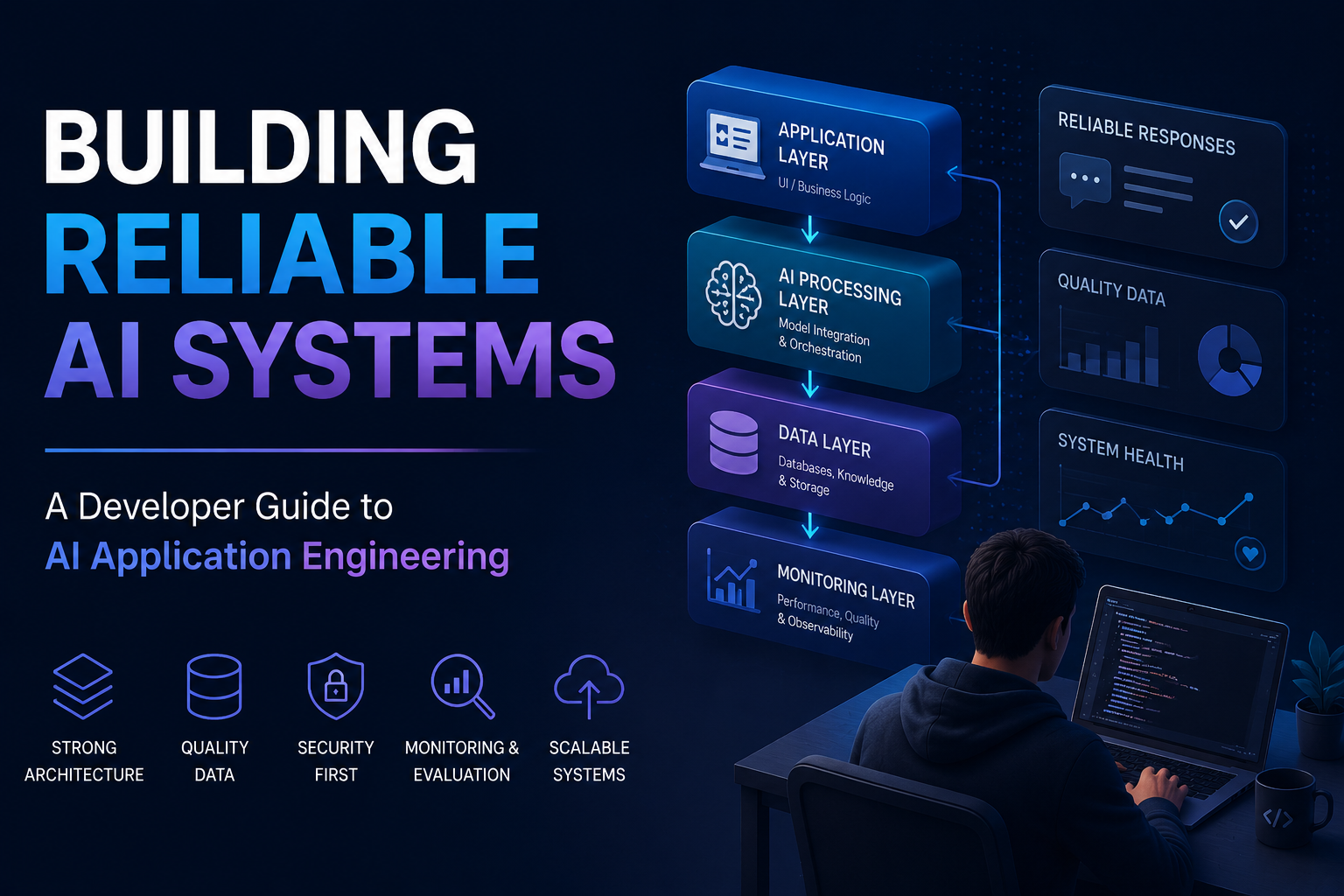
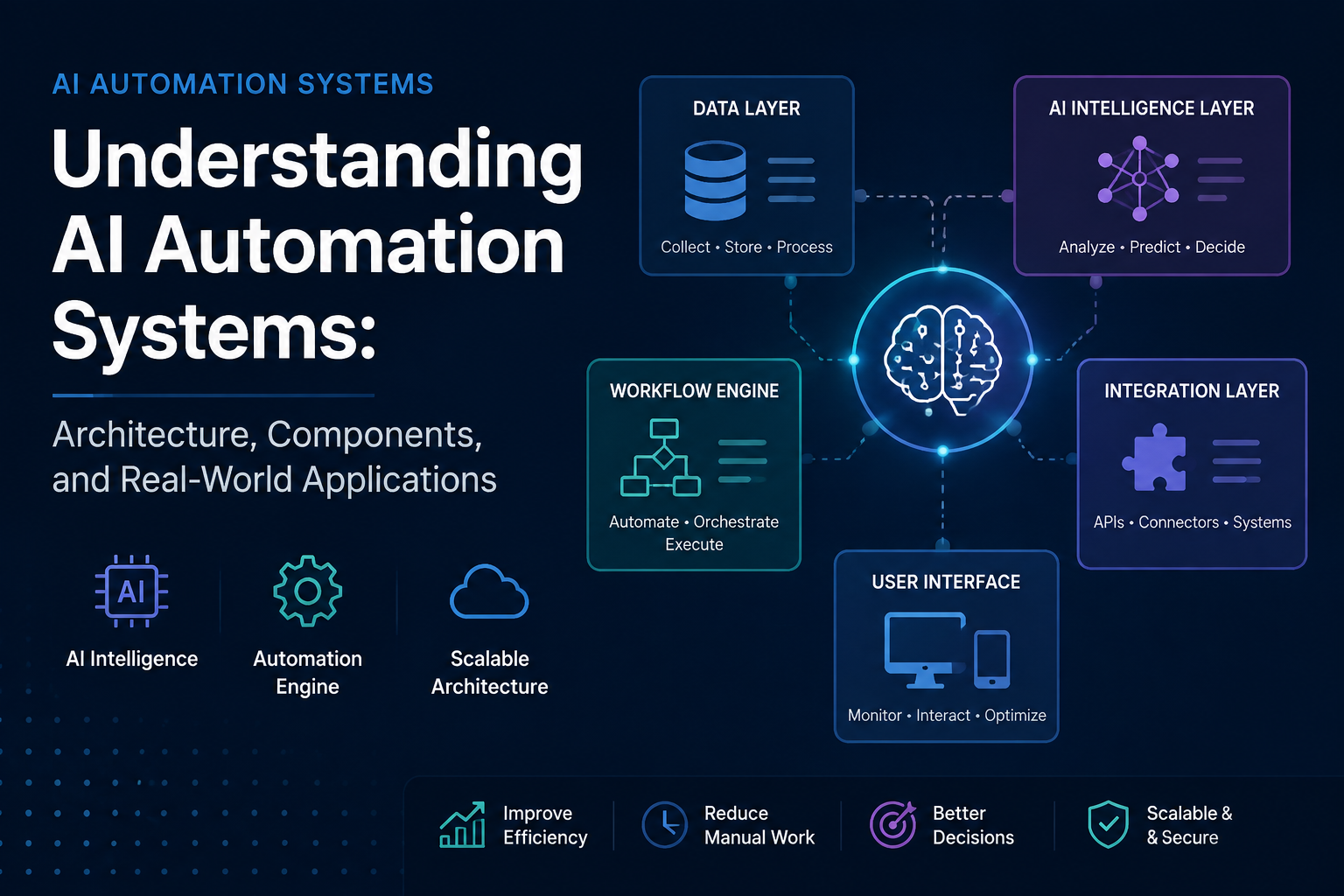
Designing Scalable AI Applications: Architecture Patterns Developers Should Know
A practical guide to building reliable AI systems using modern architecture patterns, data layers, orchestration frameworks, and scalable software design principles.
Introduction
Building an AI-powered application is no longer only about connecting an application to an AI model and generating responses.
The first generation of AI integrations focused on simple use cases:
Adding chat assistants to websites Generating text through APIs Creating basic automation scripts
However, production-level AI applications require much more than an API connection.
Developers need to think about:
Data flow System reliability Security Scalability Model orchestration Integration with existing software systems
A successful AI application is not defined only by the model being used. It depends on the architecture surrounding that model.
As AI systems become more integrated into software products, architecture decisions are becoming increasingly important for building reliable and maintainable solutions.
This article explores the key architecture patterns developers should understand when designing modern AI applications.
Why AI Applications Need Different Architecture
Traditional software applications usually follow a predictable flow:
User | Frontend | Backend | Database
The application receives input, processes logic, stores data, and returns a result.
AI-powered applications introduce additional complexity.
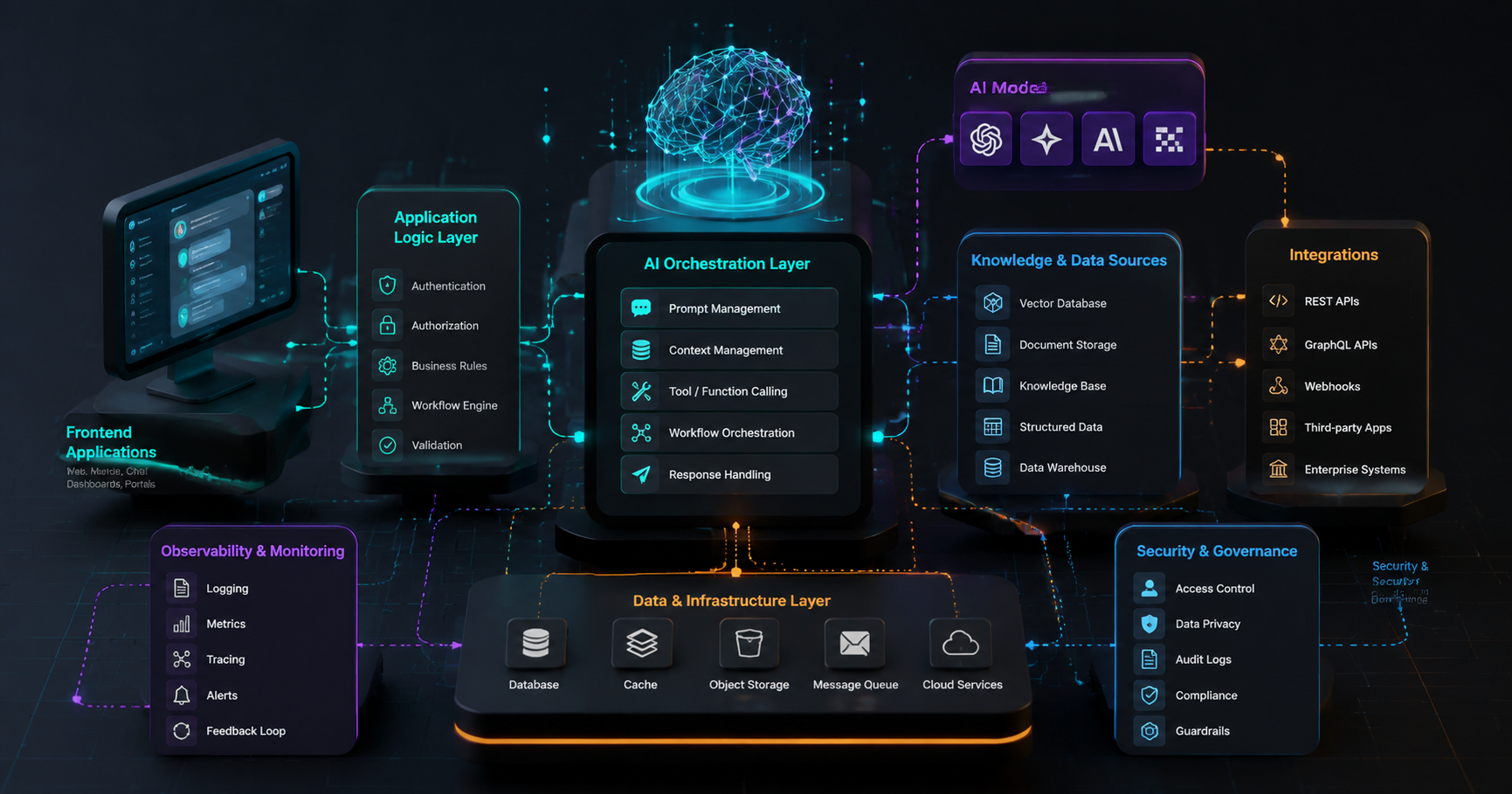
A modern AI system often looks like this:
User | Application Interface | Business Logic Layer | AI Orchestration Layer | AI Model | Knowledge Sources | External Systems
The system now needs to manage:
User requests AI reasoning External data retrieval Tool execution Context management Response validation
The architecture must support both traditional software requirements and AI-specific challenges.
Core Components of Modern AI Application Architecture
1.User Interface Layer
The user interface remains the entry point of the application.
Examples include:
Chat interfaces Business dashboards Internal AI assistants Customer support portals Developer tools
The interface should focus on collecting user intent and presenting AI-generated results clearly.
A good AI interface also needs to handle uncertainty.
Instead of simply displaying an answer, applications may need to show:
Confidence levels Sources used Required approvals Suggested actions
2. Application Logic Layer
The application layer controls the business rules around AI functionality.
Responsibilities include:
Authentication User permissions Workflow management Data validation Business logic execution
For example:
A customer support AI assistant should not directly send refunds.
The application layer should verify:
Customer identity Account status Refund policies Approval requirements
AI provides intelligence, but application logic provides control.
3.AI Orchestration Layer
The orchestration layer is one of the most important differences between traditional and AI applications.
It manages communication between:
Users AI models External tools Databases Business systems
Common responsibilities:
Prompt Management
Controls how information is provided to AI models.
Context Management
Maintains relevant conversation history and information.
Tool Calling
Allows AI systems to interact with:
APIs Databases Business applications Workflow Coordination
Handles multi-step AI processes.
For example:
User Request
↓
AI understands intent
↓
Retrieves information
↓
Calls external API
↓
Processes result
↓
Provides response
4. Data Layer
AI applications depend heavily on high-quality data.
The data layer may include:
Relational databases Document storage Data warehouses Vector databases Knowledge repositories
A common architecture pattern is Retrieval-Augmented Generation (RAG).
Instead of relying only on model knowledge:
User Question
↓
Search Internal Data
↓
Retrieve Relevant Information
↓
Send Context To AI Model
↓
Generate Response
This approach helps organizations build AI systems using their own business knowledge.
5.Integration Layer
Modern AI applications rarely operate alone.
They usually connect with:
CRM platforms ERP systems Payment systems Communication tools Internal databases
APIs and webhooks allow AI systems to interact with existing software.
Example:
Customer Request
↓
AI Classification
↓
CRM Update
↓
Notification
↓
Follow-up Workflow
The goal is not replacing every system.
The goal is making existing systems work together intelligently.
Important Architecture Patterns For AI Systems
Pattern 1: Retrieval-Augmented Generation (RAG)
RAG allows AI applications to use external knowledge sources.
Useful for:
Enterprise knowledge assistants Customer support systems Research tools Internal documentation search
Benefits:
More accurate responses Updated information Better control over data
Pattern 2: Agent-Based Architecture
AI agents represent a shift from simple response generation toward autonomous task execution.
An agent can:
Understand a goal Plan steps Use tools Evaluate results Complete actions
Example:
Business Request
↓
AI Agent
↓
Analyze Information
↓
Use Available Tools
↓
Complete Task
Many organizations are exploring agent-based systems because they allow software to handle more complex workflows.
You can also explore how AI agents are transforming modern business operations to understand practical applications of these systems.
Pattern 3: Human-In-The-Loop Architecture
Not every decision should be fully automated.
Human review remains important for:
Financial decisions Healthcare workflows Legal processes Security operations
A balanced architecture allows AI to handle repetitive work while humans approve critical actions.
Example:
AI Analysis
↓
Risk Evaluation
↓
Human Approval
↓
Final Action
Pattern 4: Event-Driven AI Systems
Event-driven architectures allow applications to react automatically when something happens.
Examples:
New customer registration Document upload Payment completion System alerts
Flow:
Event Occurs
↓
Event Processing
↓
AI Analysis
↓
Automated Action
This approach improves scalability and reduces unnecessary processing.
Common Mistakes When Building AI Systems
Building Around The Model Instead Of The Problem
A powerful AI model does not guarantee a useful application.
The architecture should start with:
User needs Business goals Workflow requirements
Ignoring Data Quality
AI systems are only as effective as the information they receive.
Poor data can create:
Incorrect outputs Unreliable decisions Poor user experiences
No Monitoring Strategy
AI applications require continuous monitoring.
Important metrics include:
Response quality Latency Cost User feedback Error rates
Lack Of Security Controls
AI systems introduce new security considerations:
Data privacy Access control Prompt injection risks Unauthorized actions
Security should be part of architecture planning from the beginning.
How AI Architecture Will Evolve
The future of software architecture will likely move toward systems that combine:
Traditional applications AI models Autonomous agents Real-time data Automated decision workflows
Developers will increasingly design systems where AI components work alongside existing software rather than replacing it completely.
The focus will shift from:
"How do we add AI to software?"
toward:
"How do we design software that works intelligently with AI?"
Final Thoughts
Building scalable AI applications requires more than selecting an advanced model.
Successful systems depend on thoughtful architecture that connects:
Users Data AI models Business logic External systems
Developers who understand these architecture patterns will be better prepared to build reliable AI-powered applications that can scale beyond simple prototypes.
AI is becoming another layer of modern software architecture — and the teams that design this layer correctly will create the next generation of intelligent applications.